No products in the cart.



Introducing Advanced Comment System
Advanced Comment System transforms the standard WordPress comment experience into a modern, engaging discussion platform. Designed for singular posts that have comments enabled, including the core Comments block, the plugin replaces the plain comment form and list with richer features such as likes, sorting, image uploads, and animated GIF support. Whether you run a personal blog or a bustling community site, Advanced Comment System keeps conversations lively and organized.
Modern Rich-Text Editing
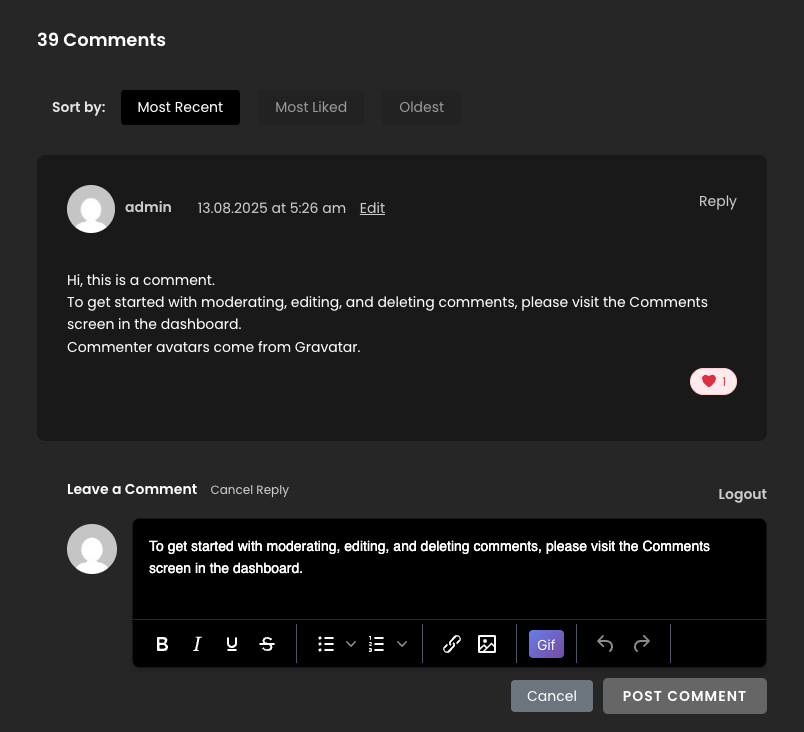
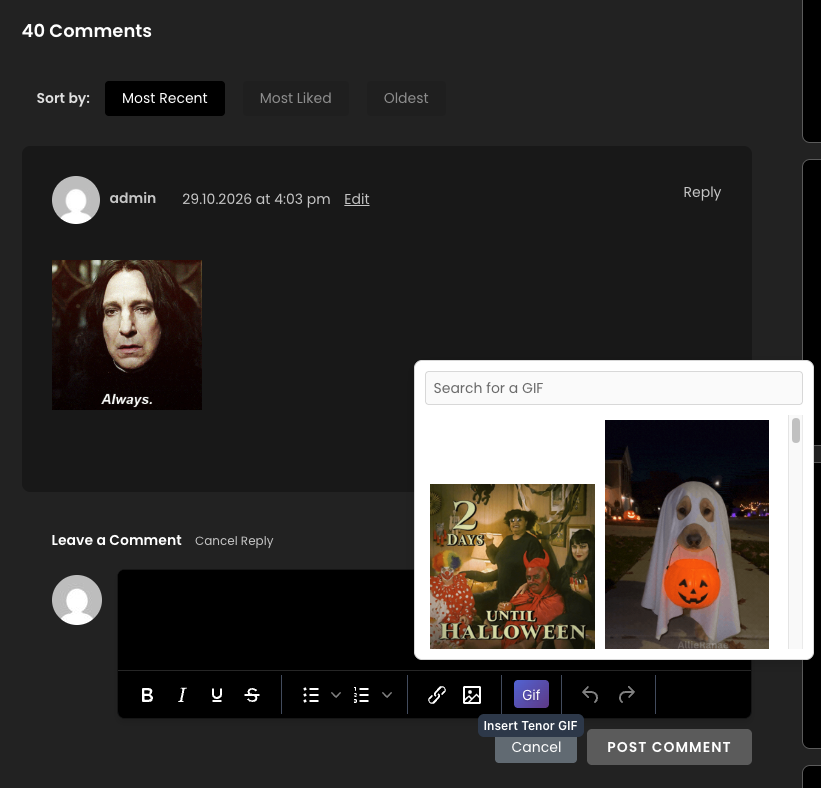
Logged-in visitors enjoy a polished TinyMCE 7.9.1 editor that appears the moment they focus the “Write a comment…” placeholder. The editor uses the sleek dark Oxide skin and places its toolbar at the bottom for easy access. Formatting tools include bold, italic, underline, strikethrough, bulleted and numbered lists, links, and images, plus dedicated undo and redo buttons. A convenient Gif button opens a quick-search panel when a Tenor API key is configured. When the user finishes typing, avatar, “Post Comment,” and “Cancel” buttons appear, while the usual “logged in as” line is replaced by a simple Logout link.
Seamless Guest Login
If your site requires login to comment, the plugin integrates smoothly with Nextend Social Login. Guests see the familiar placeholder and can sign in with one click using their preferred social accounts. The rich-text editor itself loads only after login, keeping the interface clean and secure.
Image Uploads Made Simple
Users can paste JPG, PNG, or GIF images directly into the editor. Files are uploaded via AJAX to a dedicated, access-protected directory inside wp-content/uploads. Each comment accepts only one image; additional attempts are blocked both in the browser and on the server. Transparency is preserved, and all uploads are resized to a maximum of 500 × 500 pixels to maintain fast page loads.
Animated GIFs Powered by GIPHY
With a free GIPHY API key stored safely in plugin settings, the Gif toolbar button opens an inline search panel. Visitors can browse featured GIFs or type to find exactly the right reaction. Infinite scroll loads up to 100 results, and clicking any thumbnail inserts a tastefully sized image into the comment. The API key never appears on the front end, so your integration stays secure.
Like & Sort for Better Conversations
Every comment displays a heart icon and live like count. Logged-in users can like or unlike with a single click; guests see the count but are prompted to log in if they try to interact. Above the comment list, a “Sort by” bar lets readers switch between Most Recent, Most Liked, and Oldest views. The chosen order persists through pagination, making it easy to surface the best discussions first.
Automatic Word Filtering
Site owners can maintain a simple blacklist under Settings → Advanced Comments. Any word or phrase listed—separated by new lines or commas—is stripped from new comments before they are saved. Matching is case-insensitive, so moderation queues stay clear without extra effort.
Latest Comments Shortcode
Display fresh conversations anywhere with the built-in shortcode:
- [acs_latest_comments] – shows the five newest approved comments site-wide.
- Customize output with attributes for number of comments, avatar size, relative date, like count, and cache duration.
- Override the bundled template by copying it into your theme for complete design control.
Flexible Templates & Developer Hooks
Advanced Comment System respects your theme. Copy the provided comments.php or shortcode template into your theme folder, and the plugin will use your markup instead. Action hooks such as acs_before_comment_list let developers inject custom content above the sorted list without touching core files.
Getting Started
Install the plugin, optionally add your Tenor API key and enable Nextend Social Login, then visit any post with comments enabled. The upgrade from the classic comment form is instant, and every new feature works out of the box—no extra configuration required.
Upgrade your comment section today with Advanced Comment System and watch engagement grow through richer media, intuitive sorting, and delightful interactions.








Reviews
There are no reviews yet.